Find the first name in an Email address
with HubSpot Operations Hub
Find how you can improve your CRM data by finding first names from email addresses

The logic / to find the firstname and gender
The idea is to split an email by a delimiter if one exists, then search in a huge first names list for a match.
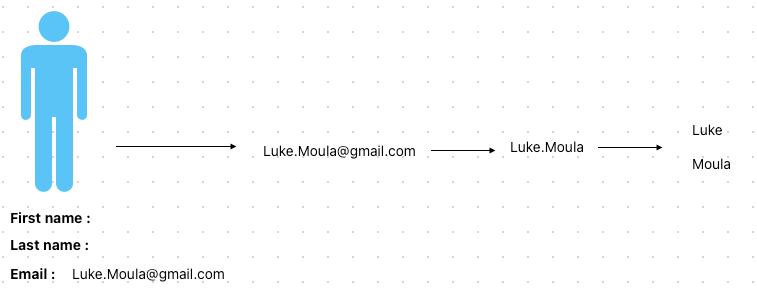
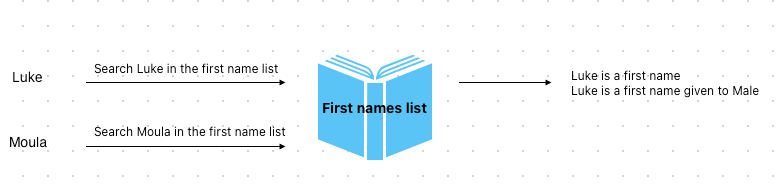
Demo / see the logic in action
Take a look at this video to see the logic in action
Implement / in your portal
Follow this video to implement this Custom Coded Action
The code / ready to be used
Here’s where you will find the code :
The source / code
Here’s the logic I created, but do not use this code in the Custom Coded Action ! Use the link above.
( This code is just the source code requires a extra build step ( Webpack ) ) this is why you can’t use that code directly.
const firstnames = require('./firstnames.js');

exports.main = async (event, callback) => {

    const email = event.inputFields.email;
    if (!email) throw new Error('email is not set, are you sure you put email in the "properties to include in code" ? ');

    const emailWithoutDomain = email.split('@')[0];


    const firstNameAndLastName = splitString(emailWithoutDomain);

    if(firstNameAndLastName.length === 1) throw new Error(`${email} can't be splitted by a separator`);

    const chunks = splitString(emailWithoutDomain).map(chunk => capitalizeString(chunk));

    const firstNameFound = [];

    for (const chunk of chunks) {

        if (firstnames[chunk]) {
            firstNameFound.push({
                firstName: chunk,
                gender: firstnames[chunk].gender
            });
        }
    }

    if(firstNameFound.length === 0) throw new Error('The firstName was not in the database');


    callback({
        outputFields: {
            gender: firstNameFound.length > -1 ? firstNameFound[0].gender : "N/A",
            firstName: firstNameFound.length > -1 ? firstNameFound[0].firstName : "N/A"
        }
    });

}


/**
 * Splits a string into an array of parts based on delimiters such as commas, dashes, underscores, dots, and forward slashes.
 *
 * @param {string} str - The string to be split.
 * @returns {array} - An array of the split string parts.
 */
const splitString = (str) => {
    return str.split(/[-_.]+/);
}

exports.splitString = splitString;


/**
 * Capitalizes the first character of a string.
 *
 * @param {string} str - The string to capitalize.
 * @returns {string} - The capitalized string.
 */
const capitalizeString = (str) => {
    return str.charAt(0).toUpperCase() + str.slice(1);
}
exports.capitalizeString = capitalizeString;