Add deal suffix in HubSpot with Operations Hub
with custom numbers
In this article I will show you how to create a custom deal name, based on the latest deal created. The logic I will create will add one to the previous deal number.

The logic we want to create
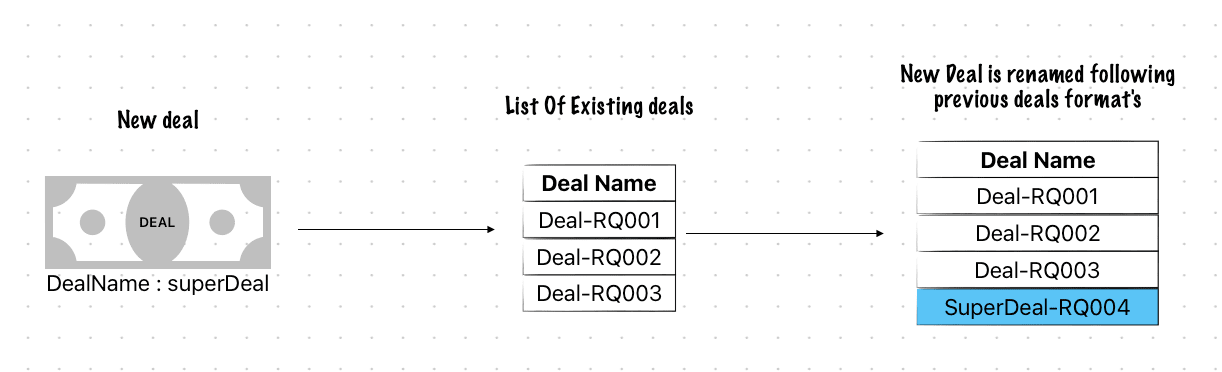
As you can see the deal is renamed based on the existing deals
Prerequisites
- HubSpot and Operations Hub
- Basic JavaScript knowledge
- Node.js installed on your computer ( if you want to follow along the coding part )
- An API key for your portal ( private App token )
The logic
- In a WorkFlow for every new deals which do not contain a given separator here
-RQ - First we ask the HubSpot API the latest deal containing
-RQ - Split the name by the separator to get the numeric value after the separator
- Add one to this value
- Build the new deal name and return it to the Workflow
How to / tutorial
In this video I explain the concept, then I show you how to code the logic and how to implement it.
The code
Here’s the final code which you can implement in your portal :
/***
 *  SET THE SEPARTOR
 *  Here set the separator
 *  If your deals name are Deal-RQ001 then set "-RQ" as a sepator
 *  The code will read the latest deal
 */

const separator = "-RQ";


const axios = require('axios');

const axiosConfig = {
    headers: {
        authorization: `Bearer ${process.env.privateAppToken}`
    }
};

exports.main = async (event, callback) => {

    if (!separator || separator === "") throw new Error('separator is not set, are you sure you put separator in the code ? ( see first lines )');

    const dealName = event.inputFields.dealName;

    if (!dealName) throw new Error('dealName is not set, are you sure you put dealName in the "properties to include in code" ? ');

    const deals = await searchDealsWithSeparator(separator).catch(axiosErrorHandler);

    console.log(deals.data.results[0].properties.dealname);

    const latestDealName = deals.data.results[0].properties.dealname;


    if (!latestDealName.includes(separator)) throw new Error("The deal doesn't contain the right separator")

    const numericValueAfterSeparator = latestDealName.split(separator)[1]


    const newNumericValue = parseInt(numericValueAfterSeparator) + 1;


    callback({
        outputFields: {
            newDealName: `${dealName}${separator}${newNumericValue}`
        }
    });

}


const getLastestsDeals = async () => {

    const endpoint = `https://api.hubapi.com/deals/v1/deal/recent/`;

    return axios.get(endpoint, axiosConfig);
}


const searchDealsWithSeparator = async (separator) => {

    const endpoint = `https://api.hubapi.com/crm/v3/objects/deals/search`;

    return axios.post(endpoint, {
        "filterGroups": [{
            "filters": [{
                "value": `*${separator}*`,
                "propertyName": "dealname",
                "operator": "CONTAINS_TOKEN"
            }]
        }],
        "properties": [
            "hubspot_owner_id",
            "dealname",
            "name"
        ],
        "sorts": [{
            "propertyName": "id",
            "direction": "DESCENDING"
        }],
        "limit": 1,
        //"after": after
    }, axiosConfig);

}
/**
 * Handles errors thrown by axios requests and logs relevant information.
 *
 * @param {Error} e - The error object thrown by axios.
 */
const axiosErrorHandler = e => {
    console.log("The : ", e.config.method, " call on", e.config.url, "failed");
    console.log("error code retuned ", e.code);
    console.log("error data returned ", e.response.data);
}